


Product Descriptions
Professional colour and speed
High-speed, automatic two-sided colour printing
Peace-of-mind with award-winning reliability
Performance you can count on page after page
Pro level security to help protect your business
Protect your data and documents with HP Wolf Pro Security.
Compact and energy efficient design
Compact size with energy saving technology to optimize energy use.
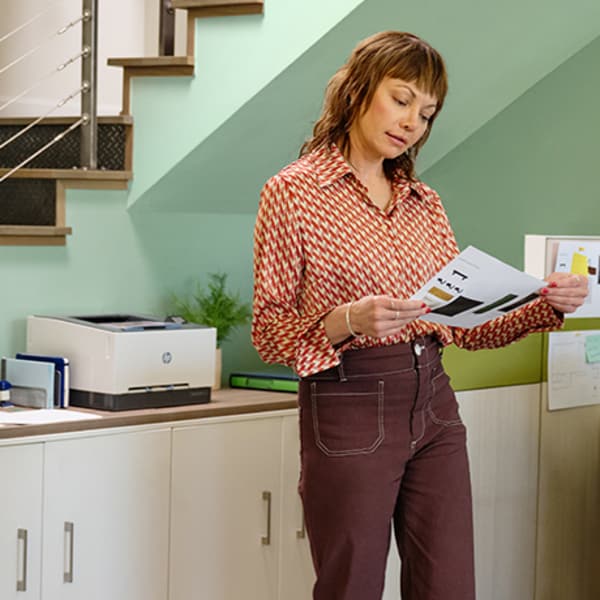
Business team solution
Support your business work team with this compact laser printer for high-quality colour printing.
Fast two-sided colour printing
Experience high-speed two-sided colour printing at up to 25 pages per minute.
True-to-life colours
Bring your business to life with next-generation HP TerraJet Toner designed for more true-to-life, vibrant colours.
Compact Design
Streamline your workspace, reduce clutter, and help boost your team's efficiency with a compact laser printer.
Specifications
| Functions |
|
|---|---|
| Print speed black (ISO, letter) |
Up to 26 ppm 1 |
| Print speed black (ISO, A4) |
Up to 25 ppm 1 |
| Print speed color (ISO) |
Up to 26 ppm 1 |
| Print Speed Color (ISO) |
Up to 25 ppm 1 |
| First page out black (letter, ready) |
As fast as 10.8 sec 2 ( 2 Measured using ISO/IEC 17629. For more information see https://www.hp.com/go/printerclaims . Exact speed varies depending on the system configuration, software application, driver, and document complexity.) |
| First page out black (A4, ready) |
As fast as 10.9 sec 2 ( 2 Measured using ISO/IEC 17629. For more information see https://www.hp.com/go/printerclaims . Exact speed varies depending on the system configuration, software application, driver, and document complexity.) |
| First page out color (letter, ready) |
As fast as 10.9 sec 2 ( 2 Measured using ISO/IEC 17629. For more information see https://www.hp.com/go/printerclaims . Exact speed varies depending on the system configuration, software application, driver, and document complexity.) |
| First page out color (A4, ready) |
As fast as 11.0 sec 2 ( 2 Measured using ISO/IEC 17629. For more information see https://www.hp.com/go/printerclaims . Exact speed varies depending on the system configuration, software application, driver, and document complexity.) |
| Duplex printing |
Automatic |
| Duty cycle (monthly, letter) |
Up to 40,000 pagesUp to 40,000 pages |
| Duty cycle (monthly, A4) |
Up to 40,000 pages |
| Recommended monthly page volume |
150 to 2,500 3 ( 3 HP recommends that the number of printed pages per month be within the stated range for optimum device performance, based on factors including supplies replacement intervals and device life over an extended warranty period.) |
| Print quality black (best) |
Up to 600 x 600 dpi |
| Print quality color (best) |
Up to 600 x 600 dpi |
| Print languages |
HP PCL6, PostScript, HP PCL5, PDF, URF, PWG-Raster, JPEG |
| Print technology |
Laser |
| Connectivity, standard |
1 Hi-Speed USB 2.0 (device); 1 Wi-Fi 802.11ac (dual band); Auto-crossover Ethernet; 1 Gigabit Ethernet 10/100TX network |
| Mobile printing capability |
HP Smart App; Apple AirPrint™; Mobile Apps; Mopria™ Certified; Wi-Fi® Direct Printing |
| Network capabilities |
Built-in 10/100 Base-TX Ethernet, Gigabit; Auto-crossover Ethernet; Authentication via 802.1X |
| Wireless capability |
Built-in dual-band Wi-Fi; Authentication via WEP, WPA/WPA2, WPA Enterprise; Encryption via AES or TKIP; WPS; Wi-Fi Direct |
| Minimum System Requirements for Macintosh |
Apple® macOS 12.0 Monterey; macOS 13.0 Ventura; macOS v14 Sonoma; 2GB HD; Internet required |
| Minimum System Requirements |
Microsoft® Windows® 11, 10: 32-bit or 64-bit, 2 GB available hard disk space, Internet connection |
| Display |
2" diagonal DFSTN-backlit (200 x 114) |
| Processor speed |
1.2 GHz |
| Maximum Memory |
256 MB
|
| Memory |
256 MB |
| Storage |
0.512GByte (4Gbits) NAND Flash |
| Compatible Operating Systems |
Windows 11; Windows 10; Android; iOS; macOS 12 Monterey; macOS 13 Ventura; macOS 14 Sonoma; macOS 15 Sequoia; Linux 4 ( 4 Windows Server 2016, Windows Server 2019, Windows Server 2022, Linux (For more information see https://www.developers.hp.com/hp-linux-imaging-and-printing )) |
| Paper handling input, standard |
250 sheets Main Input Tray; 1 sheet Priority Feed Tray |
| Paper handling output, standard |
100 sheets Output Tray |
| Finished output handling |
Sheet Feed; Stacking |
| Media types |
Paper (bond, brochure, colored, glossy, heavy, letterhead, light, plain, preprinted, prepunched, recycled, rough), transparencies, labels, envelopes, cardstock |
| Media sizes supported |
102 x 127 mm to 216 x 356 mm |
| Media sizes, custom |
76 x 127 mm to 216 x 356 mm |
| Power consumption |
415 watts (Printing), 6.1 watts (Ready), 0.63 watts (Sleep), 0.05 watts (Auto-Off), 0.05 watts (Manual-Off) 5 ( 5 Power requirements are based on the country/region where the printer is sold. Do not convert operating voltages. This will damage the printer and void the product warranty. Power consumption values typically based on measurement of 115V device.) |
| Power |
220-volt input voltage: 220 – 240V (±10%) @ 50Hz ± 3 Hz, 60Hz ± 3 Hz; 110-volt input voltage: 110 – 127V (±10%) @ 50Hz ± 3 Hz, 60Hz ± 3 Hz (Not dual voltage, product varies by part number with # Option code identifier) |
| Operating humidity range |
10 to 80% RH |
| Recommended operating humidity range |
30 to 70% RH |
| Operating temperature range |
15 to 30°C |
| Operating temperature range |
59 to 86°F |
| Blue Angel compliant |
No, please refer to the ECI (Ecolabel Comparison Information) document |
| Typical electricity consumption (TEC) number |
0.272 kWh/week (Energy Star) 6 ( 6 Power requirements are based on the country/region where the printer is sold. Do not convert operating voltages. This will damage the printer and void the product warranty. Energy Star value typically based on measurement of 115V device.) |
| Energy savings feature technology |
HP Auto-On/Auto-Off Technology |
| Energy star certified |
No |
| Safety |
IEC 60950-1:2005 +A1:2009 +A2:2013; IEC 62368-1:2014; EN 62368-1:2014 +A11:2017; IEC 62368-1:2018; EN IEC 62368-1:2020 +A11:2020; EN 60825-1:2014+A11:2021; IEC 60825-1:2014; EN 62479:2010; IEC 62479:2010; CSA C22.2 62368-1:19 3rd Ed; CSA C22.2 62368-1-14 2nd Ed; UL62368-1 2nd Ed; UL62368-1 3rd Ed, Complies with FDA performance standards for laser products except for conformance with IEC 60825-1 Ed.3.,as described in Laser Notice No. 56, dated May 8, 2019; Other safety approvals as required by individual countries |
| Security management |
Device Unique Password, Enable/Disable USB Ports, EWS Session Timeout, Access Control for Device Features, Remote Scan Enable/Disable |
| Security |
HP Security Manager; Optional Smart Security; HP Secure Print and Insights |
| Dimensions (W x D x H) |
390 x 419.12 x 254.19 mm 7 ( 7 End to End Dimensions when printer is set up and on standby) |
| Maximum dimensions (W x D x H) |
390 x 472 x 266 mm 7 ( 7 End to End Dimensions when printer is set up and on standby) |
| Weight |
13.8 kg 8 ( 8 Product Weight Inclusive of Starter Supplies) |
| What's in the box |
HP Color LaserJet Pro 3203dw; Power cord; Toner cartridge; User Guide; Flyers; 1 USB cable 9 |
| Print Cartridges/Bottle, Number |
4 (1 each black, cyan, magenta, yellow) |
| Replacement cartridges |
HP 222A Black Original LaserJet Toner Cartridge (~1,300 pages) W2220A; HP 222A Cyan Original LaserJet Toner Cartridge (~1,200 pages) W2221A; HP 222A Yellow Original LaserJet Toner Cartridge (~1,200 pages) W2222A; HP 222A Magenta Original LaserJet Toner Cartridge (~1,200 pages) W2223A; HP 222X High Yield Black Original LaserJet Toner Cartridge (~3,200 pages) W2220X; HP 222X High Yield Cyan Original LaserJet Toner Cartridge (~2,500 pages) W2221X; HP 222X High Yield Yellow Original LaserJet Toner Cartridge (~2,500 pages) W2222X; HP 222X High Yield Magenta Original LaserJet Toner Cartridge (~2,500 pages) W2223X 10 ( 10 Declared yields based on ISO/IEC 19798 and continuous printing. Actual yields vary considerably based on images printed and other factors. For details see |
Intellectual Property
- Lorem ipsum dolor sit amet, consectetur adipiscing elit. Etiam quis diam erat. Duis velit lectus, posuere a blandit sit amet, tempor at lorem. Donec ultricies, lorem sed ultrices interdum.
- Leo metus luctus sem, vel vulputate diam ipsum sed lorem. Donec tempor arcu nisl, et molestie massa scelerisque ut. Nunc at rutrum leo. Mauris metus mauris, tristique quis sapien eu, rutrum vulputate enim.
- Mauris tempus erat laoreet turpis lobortis, eu tincidunt erat fermentum.
- Aliquam non tincidunt urna. Integer tincidunt nec nisl vitae ullamcorper. Proin sed ultrices erat. Praesent varius ultrices massa at faucibus.
- Aenean dignissim, orci sed faucibus pharetra, dui mi dignissim tortor, sit amet condimentum mi ligula sit amet augue.
- Pellentesque vitae eros eget enim mollis placerat.
Termination
- There are many variations of passages of Lorem Ipsum available
- If you are going to use a passage
- All the Lorem Ipsum generators on the Internet tend to repeat predefined chunks as necessary
- It uses a dictionary of over 200 Latin words, combined with a handful of model sentence structures
- The point of using Lorem Ipsum is that it has a more-or-less normal distribution of letters
- Many desktop publishing packages and web page editors now use Lorem Ipsum as their default model text
Changes To This Agreement
We reserve the right, at our sole discretion, to modify or replace these Terms and Conditions by posting the updated terms on the Site. Your continued use of the Site after any such changes constitutes your acceptance of the new Terms and Conditions.
Contact us
If you have any questions about this Agreement, please contact us filling this contact form.
Related products


![SAMSUNG Q-LED 4K FRAME TV 65 inch [QA65LS01BAUXGH]](http://bestpricegh.com/cdn/shop/files/SS3.jpg?v=1694019729&width=100 "SAMSUNG Q-LED 4K FRAME TV 65 inch [QA65LS01BAUXGH]")


